Offline viewing
Flight, commute, spotty wifi, or just want your own copy — here's how to actually save a YouTube video to your computer in 2026, including the free, ad-free way we use ourselves.
The fastest, cleanest way to save a YouTube video for offline viewing is a small desktop app that fetches the video straight to your computer — no browser extension rifling through your tabs, no shady "YouTube to MP4" website covered in pop-up ads, and no software that quietly bundles a toolbar you didn't ask for.
That's exactly what ZoopZip does. It's free, it works on Mac and Windows, and downloading takes about the same three clicks as the messier methods below — minus the ads and the risk.
Grab the free installer for macOS or Windows — no account, no credit card, no sign-up form.
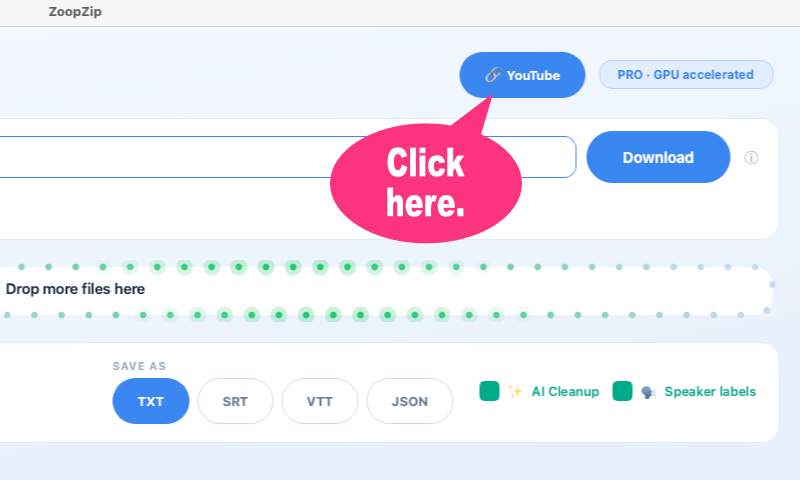
Launch ZoopZip and click the YouTube toggle at the top of the window. A paste-a-link bar appears.
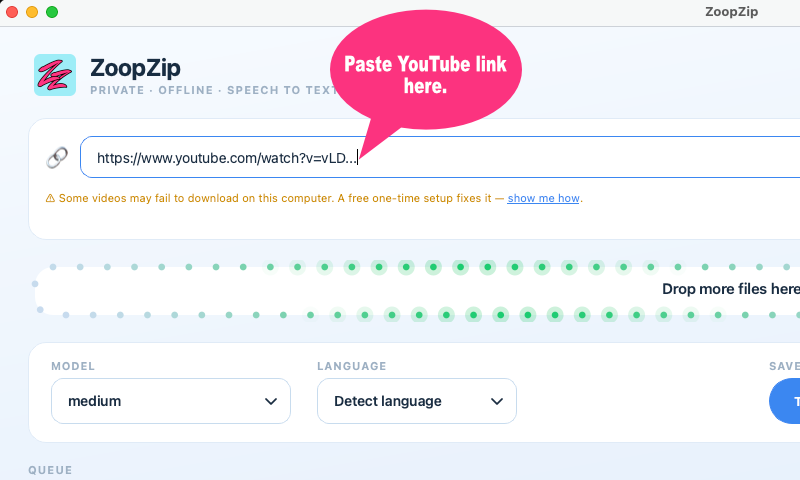
Copy the URL from YouTube (right-click the video, or copy it from the address bar), paste it into ZoopZip, and hit Download.
ZoopZip saves the video (up to 1080p) directly to your computer. Open it in any video player, anytime, with no internet connection required.

Paste a link, click convert, download a file — except these sites usually run on ad networks that push pop-ups, redirect you to sketchy pages, or bundle browser hijackers into the "download" button. The video itself is often re-encoded and lower quality than the original.
A downloader extension needs broad permission to read everything you do in your browser, and YouTube frequently changes its page structure to break these, so they stop working until (if) they're updated. Many are abandoned or quietly sold to ad companies.
Tools like yt-dlp are powerful and legitimate, but they run through a terminal with flags and options — not something most people want to learn just to save a video.
Works in a pinch, but you're re-recording the video in real time, at a lower quality, with your CPU fan spinning the whole way through.
A real desktop app, not a website full of ads. Free, no account, downloads straight to your computer up to 1080p, and doubles as a free offline transcription tool if you ever need the text too.
It depends on the video and what you do with it. Downloading your own uploads, content you have explicit permission to use, or material under a license that allows offline copies (Creative Commons, YouTube's own "Download" button on eligible videos, etc.) is fine. Downloading someone else's copyrighted work and reposting or redistributing it is not, and YouTube's Terms of Service restrict downloading in general — most people use tools like this for personal, offline viewing of content they already have the right to use.
Yes. Downloading is completely free with no account, no watermark, and no limit on how many videos you save — it's built into the free version of ZoopZip.
It depends on the video and what you do with it afterwards. Downloading your own uploads, content you have permission to use, or videos under a license that allows it is fine. Downloading someone else's copyrighted work to redistribute is not. You're responsible for how you use anything you save — ZoopZip and Amiplay Co., Ltd. accept no liability for misuse.
No. ZoopZip is a normal desktop app for Mac and Windows — no browser extension digging through your tabs, no ad-injecting toolbar, and no random "YouTube to MP4" website asking you to click through pop-ups.
Up to 1080p, which is enough for a clean, watchable file without the huge size of a 4K download.
Not yet — ZoopZip downloads one video link at a time. Paste each link separately.
No. The video is fetched straight to your own computer. Nothing is sent to ZoopZip's servers, to Amiplay, or to anyone else.
Yes — that's actually what ZoopZip is built for. Once a video is downloaded, you can transcribe it offline into a TXT or SRT file in the same app, for free.
Free · no account · no ads
Get ZoopZip, paste a link, and watch it offline whenever you want.
Download ZoopZip Freev0.1.28 ZoopZip